VISUALISE FROM ggsql:penguins
DRAW point
MAPPING bill_dep AS x, body_mass AS y, species AS fill
SETTING stroke => null
SCALE color TO category10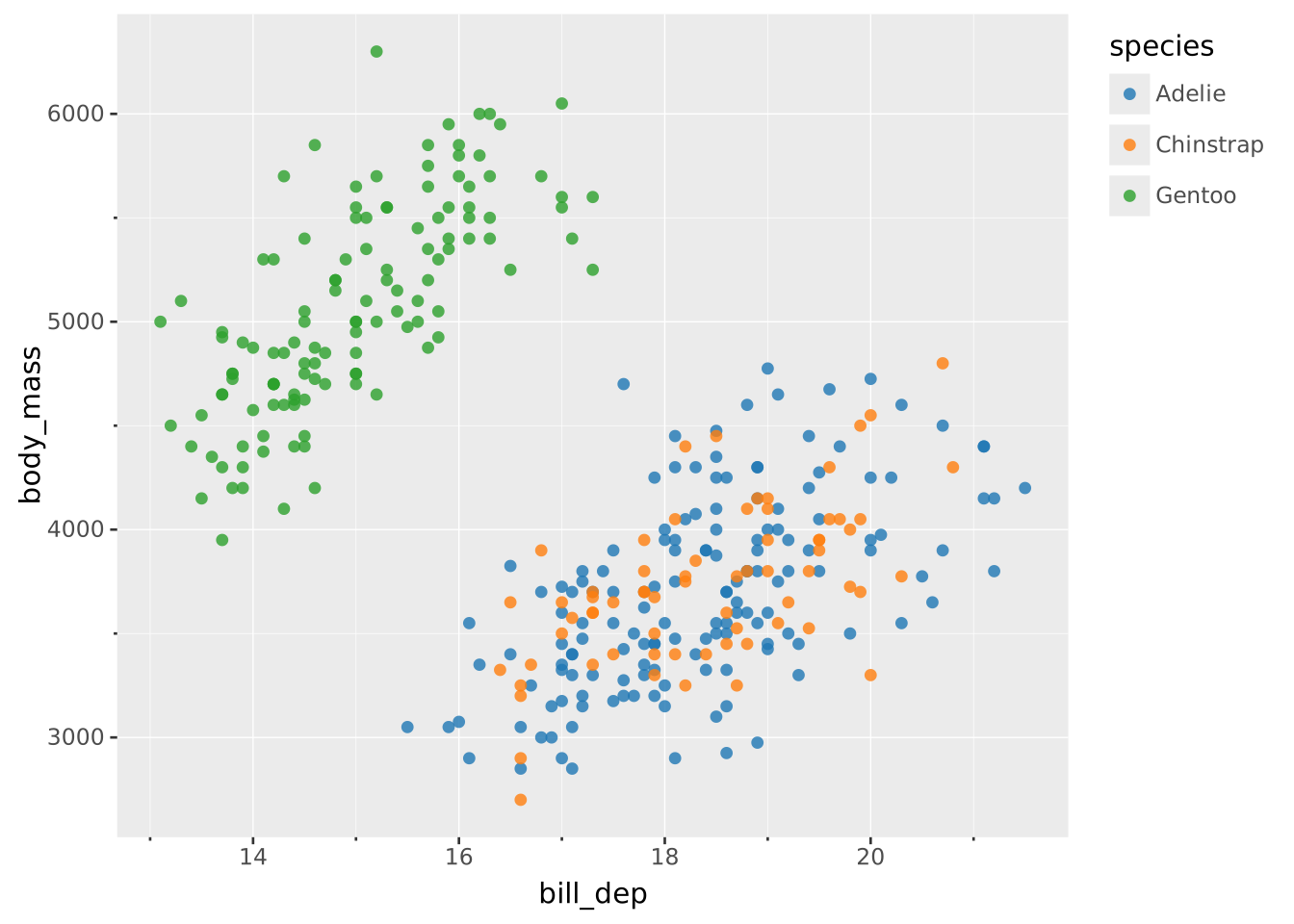
Color values are used in two places in ggsql: When setting stroke color and fill color. Stroke color governs the color of lines, be it the outline of a rectangle (e.g. in a bar layer), or the line of a path (e.g. in a line layer). The fill color determines the color of the inside of a shape. It follows that all layers respond to the stroke aesthetic but only those containing closed shapes respond to the fill aesthetic.
In addition to the fill and stroke aesthetics there is also a color meta-aesthetic. Setting this will set the fill and stroke at the same time unless they are set directly. For instance, the following will set the fill and stroke to red
DRAW bar
  SETTING color => 'red'
whereas this will set the fill to red and stroke to black
DRAW bar
  SETTING color => 'red', stroke => 'black'
The same logic applies when defining a scale. Defining a color scale creates two scales, one for fill and one for stroke, with the same settings (unless either are defined explicitly). For instance, the following
SCALE color TO viridisdefines two separate scales for fill and stroke that both use the viridis palette.
In general, it is highly advisable to be explicit and directly use the fill and stroke aesthetics. The color meta-aesthetic is a quick shortcut if you need it.
Literal color values can be defined in any CSS compatible way 1. The gist of it is that colors can be defined in one of three different ways:
'red', or 'lemonchiffon''#FF0000' or '#FFFACD88''rgba(100%, 0%, 0%, 50%)' or 'oklab(98%, -0.012, 0.057)'Literal color values are used in three places in ggsql. Either when setting an aesthetic (as opposed to mapping), e.g.
DRAW line
  SETTING stroke => '#FF0000'
when you define the output range of a fill or stroke scale manually, e.g.
SCALE fill TO ('rgb(100%, 0%, 0%)', 'lemonchiffon')or when using an identity scale for color in which case the data values must be parsable as colors.
Note that all different types of color notation can be mixed in the same place.
Literal color values may be translucent, either by providing a fourth channel the the hex-notation, or by using a css color function that includes an alpha level (e.g. rgba()). You should avoid mixing this with the use of the opacity aesthetic to ensure the opacity is predictable.
There are two different types of palettes for fill and stroke — those intended for continuous data and those intended for discrete data. While they both consist of multiple color values, the continuous palettes are meant for interpolation between successive values whereas the discrete palettes are not.
Palettes are used by giving them as names in the TO clause:
VISUALISE FROM ggsql:penguins
DRAW point
  MAPPING bill_dep AS x, body_mass AS y, species AS fill
  SETTING stroke => null
SCALE color TO category10
Instead of using a named palette you can create one on the fly using an array of color values:
VISUALISE FROM ggsql:penguins
DRAW point
  MAPPING bill_dep AS x, body_mass AS y, flipper_len AS fill
  SETTING stroke => null
SCALE color TO ('antiquewhite', 'firebrick')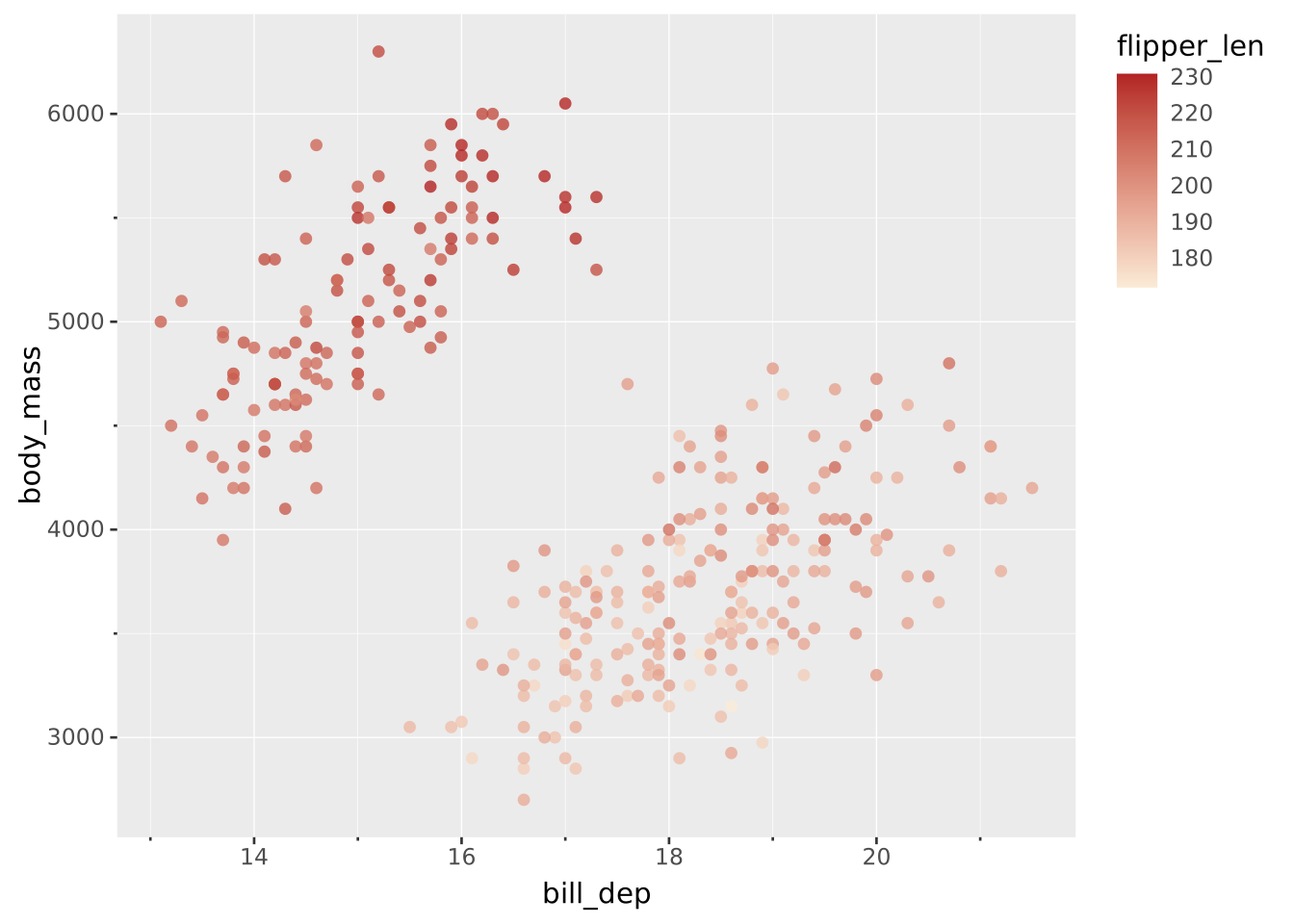
Sequential palettes for numeric data. sequential is the default continuous color palette in ggsql.
| Name | Gradient | Source | Description |
|---|---|---|---|
sequential |
 |
ggsql | Default. Blue-teal-green (derived from navia) |
acton |
 |
Crameri | Dark purple-light purple |
bamako |
 |
Crameri | Teal-olive-cream |
batlow |
 |
Crameri | Blue-teal-green-brown-pink |
batlowk |
 |
Crameri | Dark variant of batlow |
batloww |
 |
Crameri | Light variant of batlow |
bilbao |
 |
Crameri | Brown-tan-white |
buda |
 |
Crameri | Magenta-pink-yellow |
davos |
 |
Crameri | Dark blue-teal-green-white |
devon |
 |
Crameri | Dark purple-blue-white |
glasgow |
 |
Crameri | Purple-brown-olive-light purple |
grayc |
 |
Crameri | Black-white grayscale |
hawaii |
 |
Crameri | Magenta-orange-green-cyan |
imola |
 |
Crameri | Blue-teal-green-yellow |
lajolla |
 |
Crameri | Dark brown-orange-yellow-cream |
lapaz |
 |
Crameri | Dark purple-blue-teal-cream |
lipari |
 |
Crameri | Dark blue-red-orange-cream |
navia |
 |
Crameri | Blue-teal-green-cream |
nuuk |
 |
Crameri | Blue-teal-green-yellow |
oslo |
 |
Crameri | Black-blue-white |
tokyo |
 |
Crameri | Dark purple-magenta-olive-green |
turku |
 |
Crameri | Black-olive-tan-pink |
blues |
 |
ColorBrewer | Light to dark blue |
greens |
 |
ColorBrewer | Light to dark green |
oranges |
 |
ColorBrewer | Light to dark orange |
reds |
 |
ColorBrewer | Light to dark red |
purples |
 |
ColorBrewer | Light to dark purple |
greys |
 |
ColorBrewer | Light to dark grey (also grays) |
ylorbr |
 |
ColorBrewer | Yellow-Orange-Brown |
ylorrd |
 |
ColorBrewer | Yellow-Orange-Red |
ylgn |
 |
ColorBrewer | Yellow-Green |
ylgnbu |
 |
ColorBrewer | Yellow-Green-Blue |
gnbu |
 |
ColorBrewer | Green-Blue |
bugn |
 |
ColorBrewer | Blue-Green |
bupu |
 |
ColorBrewer | Blue-Purple |
pubu |
 |
ColorBrewer | Purple-Blue |
pubugn |
 |
ColorBrewer | Purple-Blue-Green |
purd |
 |
ColorBrewer | Purple-Red |
rdpu |
 |
ColorBrewer | Red-Purple |
orrd |
 |
ColorBrewer | Orange-Red |
viridis |
 |
Matplotlib | Dark purple through blue and green to yellow |
plasma |
 |
Matplotlib | Dark purple through pink to yellow (higher contrast) |
magma |
 |
Matplotlib | Black through purple and pink to light yellow |
inferno |
 |
Matplotlib | Black through red and orange to light yellow |
cividis |
 |
Matplotlib | Dark blue through gray to yellow (colorblind-optimized) |
Diverging palettes emphasize a critical midpoint with two contrasting hues on either side. Ideal for data with a meaningful center point (e.g., zero, average).
| Name | Gradient | Source | Description |
|---|---|---|---|
vik |
 |
Crameri | Blue-white-red (alias: diverging) |
berlin |
 |
Crameri | Light blue-dark-light red |
roma |
 |
Crameri | Brown-cream-blue |
bam |
 |
Crameri | Purple-white-green |
broc |
 |
Crameri | Purple-white-olive |
cork |
 |
Crameri | Purple-white-green |
lisbon |
 |
Crameri | Light purple-dark-light yellow |
managua |
 |
Crameri | Yellow-dark-cyan |
tofino |
 |
Crameri | Light purple-dark-light green |
vanimo |
 |
Crameri | Pink-dark-light green |
rdbu |
 |
ColorBrewer | Red-Blue |
rdylbu |
 |
ColorBrewer | Red-Yellow-Blue |
rdylgn |
 |
ColorBrewer | Red-Yellow-Green |
spectral |
 |
ColorBrewer | Spectral (rainbow-like) |
brbg |
 |
ColorBrewer | Brown-Blue-Green |
prgn |
 |
ColorBrewer | Purple-Green |
piyg |
 |
ColorBrewer | Pink-Yellow-Green |
rdgy |
 |
ColorBrewer | Red-Grey |
puor |
 |
ColorBrewer | Orange-Purple |
Multi-sequential palettes have multiple sequential segments, useful for categorical data with ordered subcategories.
| Name | Gradient | Source | Description |
|---|---|---|---|
bukavu |
 |
Crameri | Multi-hue sequential |
fes |
 |
Crameri | Multi-hue sequential |
oleron |
 |
Crameri | Topographic (land/sea) |
Cyclic palettes wrap around, making them suitable for periodic data like angles, phases, or time of day.
| Name | Gradient | Source | Description |
|---|---|---|---|
romao |
 |
Crameri | Cyclic purple-orange-teal-blue (alias: cyclic) |
bamo |
 |
Crameri | Cyclic purple-pink-cream-olive |
broco |
 |
Crameri | Cyclic gray-blue-cream-olive |
corko |
 |
Crameri | Cyclic gray-blue-teal-green |
viko |
 |
Crameri | Cyclic purple-blue-cream-orange |
Qualitative palettes for categorical data where no ordering is implied.
| Name | Swatches | Colors | Source | Description |
|---|---|---|---|---|
ggsql10 |
 |
10 | ggsql | Default. Optimized for distinguishability |
tableau10 |
 |
10 | Tableau | Tableau’s default categorical palette |
category10 |
 |
10 | D3 | D3’s default categorical palette |
set1 |
 |
9 | ColorBrewer | Bold, saturated colors |
set2 |
 |
8 | ColorBrewer | Muted, softer colors |
set3 |
 |
12 | ColorBrewer | Pastel-like, lighter colors |
pastel1 |
 |
9 | ColorBrewer | Light pastel colors |
pastel2 |
 |
8 | ColorBrewer | Soft pastel colors |
dark2 |
 |
8 | ColorBrewer | Dark, saturated colors |
paired |
 |
12 | ColorBrewer | Light-dark paired colors |
accent |
 |
8 | ColorBrewer | Accent colors for emphasis |
kelly22 |
 |
20 | Kelly | Maximum contrast colors |
Crameri, F. (2018). Scientific colour maps. Zenodo. doi:10.5281/zenodo.1243862
Crameri, F., Shephard, G.E., & Heron, P.J. (2020). The misuse of colour in science communication. Nature Communications, 11, 5444.
Brewer, C.A. (2002). ColorBrewer: Color Advice for Cartography. colorbrewer2.org
van der Walt, S. & Smith, N. (2015). A Better Default Colormap for Matplotlib. SciPy 2015.
Tableau Software. tableau.com
Bostock, M. D3.js. d3js.org
Kelly, K.L. (1965). Twenty-two colors of maximum contrast. Color Engineering, 3(6), 26-27.
sequential (default) - Good all-purpose choice, perceptually uniformviridis - Excellent for print, colorblind-safe, perceptually uniformbatlow - Wide perceptual range, good for scientific dataUse a diverging palette:
vik or berlin - Clear red/blue contrastroma - Warm/cool contrast without red/blueConsider multi-sequential palettes:
oleron - Good for topographic dataUse a cyclic palette:
romao - Smooth transitions that wrap aroundggsql10 (default) - Good all-purpose choice, accessibletableau10 - Familiar to many users, well-testedcategory10 - Standard web visualization palettekelly22 - Up to 20 distinguishable colorsset3 or paired - 12 colors eachpastel1 or pastel2 - Light, unobtrusiveset2 - Muted but still distinguishableset1 - Highly saturated, attention-grabbingdark2 - Rich, deep colorsviridis, cividis, and the Crameri scientific palettes are designed to be distinguishable by colorblind viewers.viridis and cividis maintain luminance variation when desaturated.viridis, plasma, etc.) are perceptually uniform.For a complete overview see the documentation for the csscolorparser crate which is what we use internally.↩︎