-- For example, for DuckDB, one could use:
INSTALL spatial;
LOAD spatial;Map
The map coordinate system facilitates the display of geographical data. It can project data to various coordinate reference systems or projections. It is used to display choropleths and other types of maps.
Default aesthetics
- Primary:
lonfor longitude (horizontal) - Secondary:
latfor latitude (vertical)
Users can provide their own aesthetic names if needed. For example, if using x and y aesthetics:
PROJECT x, y TO mapThis maps x to longitude and y to latitude. This is a convenience when converting from a Cartesian coordinate system, without having to modify all the mappings.
Settings
clip: Should data be removed if it appears outside the bounds of the coordinate system, or has become invalid due to the projection. Defaults totrue.targetA string giving the target Coordinate Reference System (CRS) holding parameters of a coordinate transformation, or whole number giving an EPSG code. This is only used with unnamed projections and therefore mutually exclusive with theoriginandparallelsettings. By default, matches the Spatial Reference Identifiers (SRIDs) of geometry columns. Typically takes one of the following forms:- A proj string like
'+proj=longlat +lon_0=90'for 2D longitude/latitude with 90° longitude offset. - An EPSG code like
'EPSG:3395'(string) or3395for World Mercator projection.
- A proj string like
sourceA string giving the source CRS for the data to use as fallback when not explicit in geometry. Useful when using non-spatial layers that don’t carry SRIDs. Defaults to'EPSG:4326'or longitude/latitude coordinates.boundsA numeric array of length 4 giving the bounding box of the area to view. The numbers mean (‘xmin’, ‘ymin’, ‘xmax’, ‘ymax’) in that order, in the units of thetargetargument. Be mindful that your data might be in longitude/latitude degrees, but thetargetmight use meters, or vice versa. Bounds can haveInf/-Infvalues to indicate the visible area’s extent. Usingnullvalues indicates to fall back to the data’s extent, so only partial bounds need to be indicated.originProjection origin location. This is only used with named projections and therefore mutually exclusive withtarget. One of the following:- A scalar number, setting the origin longitude or ‘central meridian’ in degrees between −180 and +180. Corresponds to the
+lon_0proj string parameter. - An array of two numbers, where the first number is the scalar option above. The second number sets the latitude of origin in degrees between −90 and +90. The latter corresponds to the
+lat_0proj string parameter. If unsupported by the projection, the latitude is silently ignored.
- A scalar number, setting the origin longitude or ‘central meridian’ in degrees between −180 and +180. Corresponds to the
parallelSetting for conic or cylindrical projections. This is only used with named projections and therefore mutually exclusive withtarget. If unsupported by the projection, this setting is silently ignored. One of the following:- A scalar number, setting the standard parallel as degrees between −90 and +90. Corresponds to the
+lat_1proj string parameter. - An array of two numbers, where the first number is the scalar option above. The second number sets the second standard parallel as degrees between −90 and +90.
- A scalar number, setting the standard parallel as degrees between −90 and +90. Corresponds to the
Supported projections
There are two main ways to set the map projection. One is via a named projection, which allows for the origin and parallel settings.
PROJECT TO orthographic SETTING origin => (150, 52)The second option is to use the generic PROJECT TO crs together with the target setting. The code below is equivalent to the code above.
PROJECT TO crs SETTING target => '+proj=ortho +lon_0=150 +lat_0=52'In this context, ‘supported’ means that we are reasonably confident that we can draw a serviceable map. Below follows a table giving an overview of the supported projections. The projections are recognised by name in the ‘string’ column or from the ‘proj string’ CRS setting. More information about them can be found on the PRØJ website.
| name | string | origin | parallel | proj string |
|---|---|---|---|---|
| Geographic (unprojected) | geographic |
0 | NA | +proj=longlat |
| Mercator | mercator |
0 | NA | +proj=merc |
| Transverse Mercator | transverse_mercator |
(0, 0) | NA | +proj=tmerc |
| Universal Transverse Mercator (UTM) | utm |
(0, 0)1 | NA | +proj=utm |
| Orthographic | orthographic |
(0, 0) | NA | +proj=ortho |
| Miller Cylindrical | miller |
0 | NA | +proj=mill |
| Equidistant Cylindrical (Plate Carée) | equirectangular |
0 | NA | +proj=eqc |
| Stereographic | stereographic |
(0, 0) | NA | +proj=stere |
| Gnomonic | gnomonic |
(0, 0) | NA | +proj=gnom |
| Cylindrical Equal Area | equal_area |
0 | NA | +proj=cea |
| Mollweide | mollweide |
0 | NA | +proj=moll |
| Sanson-Flamsteed Sinusoidal | sinusoidal |
0 | NA | +proj=sinu |
| Eckert IV | eckert4 |
0 | NA | +proj=eck4 |
| Natural Earth | natural |
0 | NA | +proj=natearth |
| Winkel Tripel | winkel_tripel |
0 | NA | +proj=wintri |
| Albers Equal Area | albers |
(0, 0) | (29.5, 45.5) | +proj=aea |
| Lambert Conformal Conic | lambert_conformal |
(0, 0) | (29.5, 45.5) | +proj=lcc |
| Lambert Azimuthal | lambert |
(0, 0) | NA | +proj=laea |
| Azimuthal Equidistant | azimuthal_equidistant |
(0, 0) | NA | +proj=aeqd |
| Interrupted Goode Homolosine | igh |
0 | NA | +proj=igh |
| Robinson | robinson |
0 | NA | +proj=robin |
| Equal Earth | equal_earth |
0 | NA | +proj=eqearth |
The way to draw an unsupported map is to use the target setting. Unsupported maps are likely drawn without projection-appropriate clipping.
Choosing projections
Which projection is suitable for you data is a question without a singular answer. One thing to keep in mind is the zoom level of your data.
If the data is the size of a city, projection distortions are unlikely to affect your data as long as your set the origin appropriately. You can set PROJECT TO geographic SETTING origin => (77.59, 12.97) to center on Bengaluru, India for example.
If the data encompasses a medium sized country, you may want to look up the particular guide lines of that country’s government or governmental bodies. For example, the United Kingdom Ordnance Survey / British National Grid uses the transverse mercator projection, so you can use PROJECT TO transverse_mercator SETTING origin => (-2, 49) to display the UK according to that standard.
As countries get larger or one has small collections of contiguous countries, a reasonable projection is often the Lambert projection. We include a table below for projections of areas around the globe that aren’t too unreasonable.
For large continents or world-wide data the distortions of projections become tangible. A reasonable choice in our minds is the Robinson projection.
A second thing to keep in mind are the bounds of the area. It can be particularly salient to set the bounds to limit the view to a particular area of the globe.
| Region | Code | Bounds |
|---|---|---|
| World | PROJECT TO robinson |
bounds => (-Inf, -Inf, Inf, Inf) |
| Hemisphere | PROJECT TO orthographic |
bounds => (-Inf, -Inf, Inf, Inf) |
| - Western | PROJECT TO orthographic SETTING origin => -90 |
bounds => (-Inf, -Inf, Inf, Inf) |
| - Eastern | PROJECT TO orthographic SETTING origin => 90 |
bounds => (-Inf, -Inf, Inf, Inf) |
| - Northern | PROJECT TO orthographic SETTING origin => (0, 90) |
bounds => (-Inf, -Inf, Inf, Inf) |
| - Southern | PROJECT TO orthographic SETTING origin => (0, -90) |
bounds => (-Inf, -Inf, Inf, Inf) |
| Africa | PROJECT TO lambert SETTING origin => (20, 5) |
bounds => (-3986969, -4319444, 3357256, 3555248) |
| - Eastern | PROJECT TO lambert SETTING origin => (45, -10) |
bounds => (-2485286, -1881553, 680408, 3064123) |
| - Middle | PROJECT TO lambert SETTING origin => (20, 0) |
bounds => (-1276327, -1975357, 1241244, 2573531) |
| - Northern | PROJECT TO lambert SETTING origin => (15, 25) |
bounds => (-3271706, -1818186, 2459352, 1377522) |
| - Southern | PROJECT TO lambert SETTING origin => (25, -25) |
bounds => (-1408973, -1097730, 778101, 852074) |
| - Western | PROJECT TO lambert SETTING origin => (-5, 10) |
bounds => (-1388746, 1555900, 2247794, 4064663) |
| Antarctica | PROJECT TO azimuthal_equidistant SETTING origin => (0, -90) |
bounds => (-2535161, -2156427, 2659691, 2224369) |
| Asia | PROJECT TO albers SETTING origin => (105, 0), parallel => (30, 62) |
bounds => (-6653237, -701460, 5001976, 9142008) |
| - Central | PROJECT TO lambert SETTING origin => (65, 45) |
bounds => (-1357713, -1075006, 1603302, 1160249) |
| - Eastern | PROJECT TO lambert SETTING origin => (105, 35) |
bounds => (-2642407, -1845815, 3148102, 2170808) |
| - South-Eastern | PROJECT TO lambert SETTING origin => (110, 10) |
bounds => (-1836446, -2224711, 3425353, 2052964) |
| - Southern | PROJECT TO lambert SETTING origin => (80, 20) |
bounds => (-3140554, -1548622, 1707956, 2573856) |
| - Western / Middle East | PROJECT TO lambert SETTING origin => (45, 25) |
bounds => (-1634088, -1371350, 1519631, 2057398) |
| Europe | PROJECT TO lambert SETTING origin => (10, 52) |
bounds => (-1687768, -1761815, 2155953, 2102645) |
| - Eastern | PROJECT TO lambert SETTING origin => (25, 52) |
bounds => (-904550, -1195071, 1098494, 468294) |
| - Northern | PROJECT TO lambert SETTING origin => (20, 64) |
bounds => (-2003362, -1267426, 582862, 1853149) |
| - Southern | PROJECT TO lambert SETTING origin => (15, 42) |
bounds => (-2098608, -736857, 1024881, 571892) |
| - Western | PROJECT TO lambert SETTING origin => (5, 50) |
bounds => (-753362, -936857, 889011, 564838) |
| America | PROJECT TO robinson SETTING origin => -60 |
bounds => (-8327741, -5900074, 2745258, 8343003) |
| - Carribean | PROJECT TO lambert SETTING origin => (-72, 18) |
bounds => (-1337792, -856917, 1214234, 1010027) |
| - Northern America | PROJECT TO albers SETTING origin => (-96, 40), parallel => (40, 60) |
bounds => (-3765000, -1532628, 3074952, 5509261) |
| - Southern America | PROJECT TO albers SETTING origin => (-60, -32), parallel => (-5, -42) |
bounds => (-2373580, -2574236, 2746120, 4876480) |
| - Central America | PROJECT TO lambert SETTING origin => (-85, 13) |
bounds => (-3004039, -635755, 855420, 2419594) |
| Oceania | PROJECT TO lambert SETTING origin => (165, -25) |
bounds => (-5010611, -2393125, 1625696, 2409356) |
| - Melanesia | PROJECT TO lambert SETTING origin => (165, -10) |
bounds => (-2654127, -1370119, 1624274, 801799) |
| - Australia & New Zealand | PROJECT TO lambert SETTING origin => (150, -25) |
bounds => (-3639536, -2515577, 2483275, 1562727) |
| Atlantic Ocean | PROJECT TO azimuthal_equidistant SETTING origin => -30 |
bounds => (-5000000, -9000000, 5000000, 9000000) |
| Pacific Ocean | PROJECT TO azimuthal_equidistant SETTING origin => -160 |
bounds => (-10000000, -9000000, 10000000, 6000000) |
| Indian Ocean | PROJECT TO azimuthal_equidistant SETTING origin => (80, -20) |
bounds => (-5000000, -6000000, 5000000, 5000000) |
| Arctic Ocean | PROJECT TO azimuthal_equidistant SETTING origin => (0, 90) |
bounds => (-3000000, -3000000, 3000000, 3000000) |
Examples
Note that depending on your reader, you may need to activate modules for spatial analysis.
Via named projection
VISUALISE continent AS fill FROM ggsql:world
DRAW spatial
PROJECT TO robinson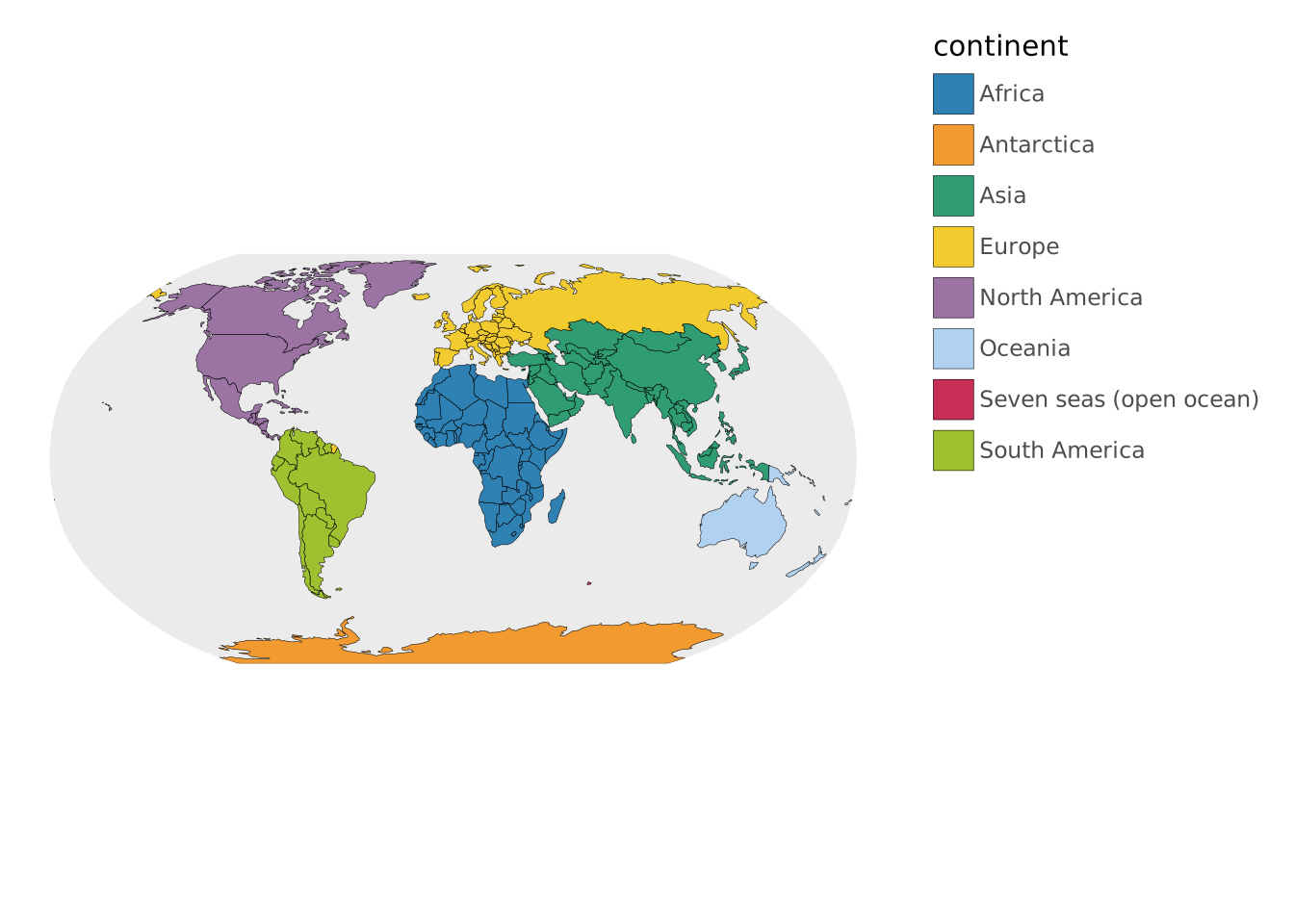
Via proj string
VISUALISE continent AS fill FROM ggsql:world
DRAW spatial
PROJECT TO crs SETTING target => '+proj=robin'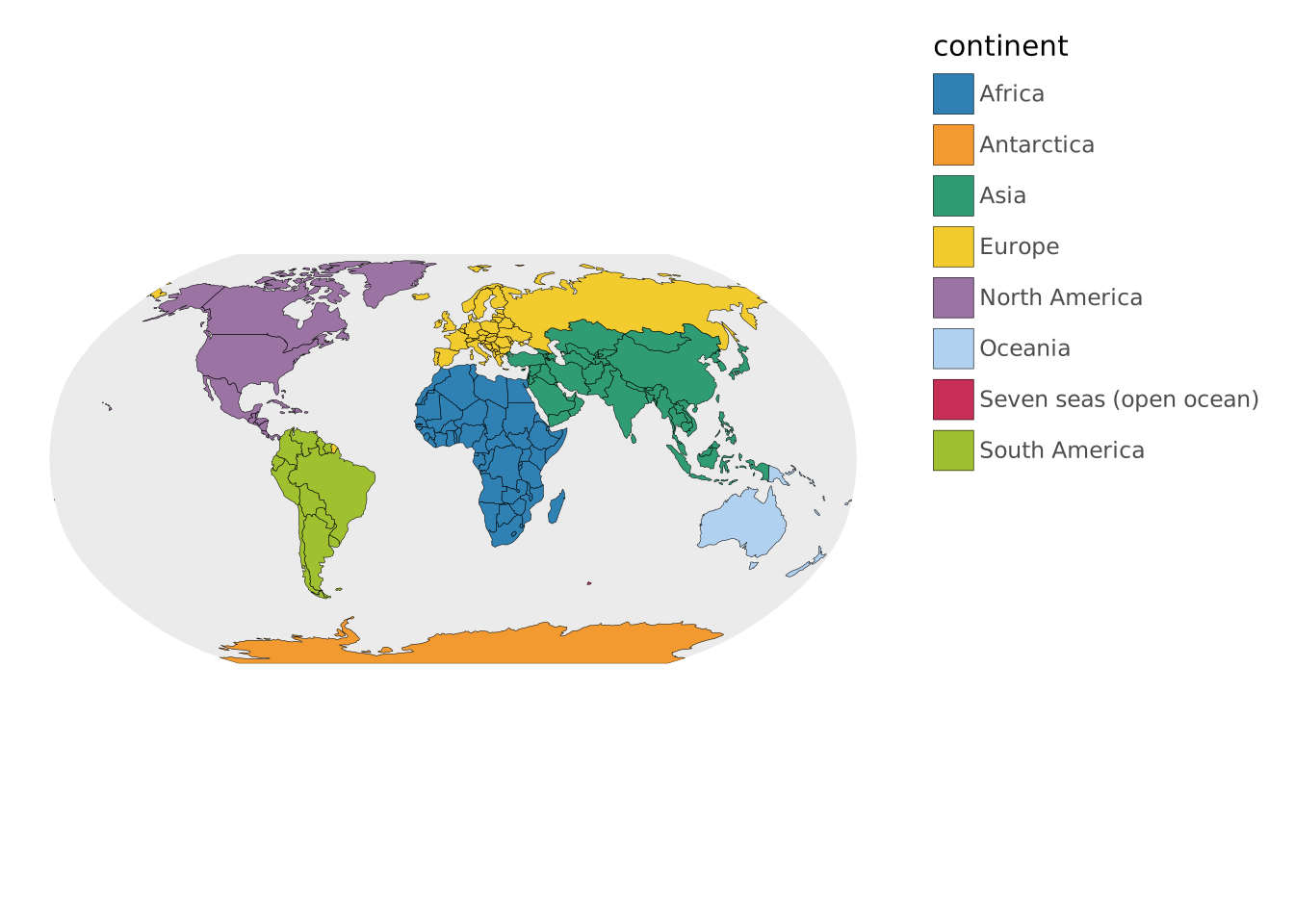
Setting the origin
VISUALISE continent AS fill FROM ggsql:world
DRAW spatial
PROJECT TO orthographic
  SETTING origin => (133.77, -25.27)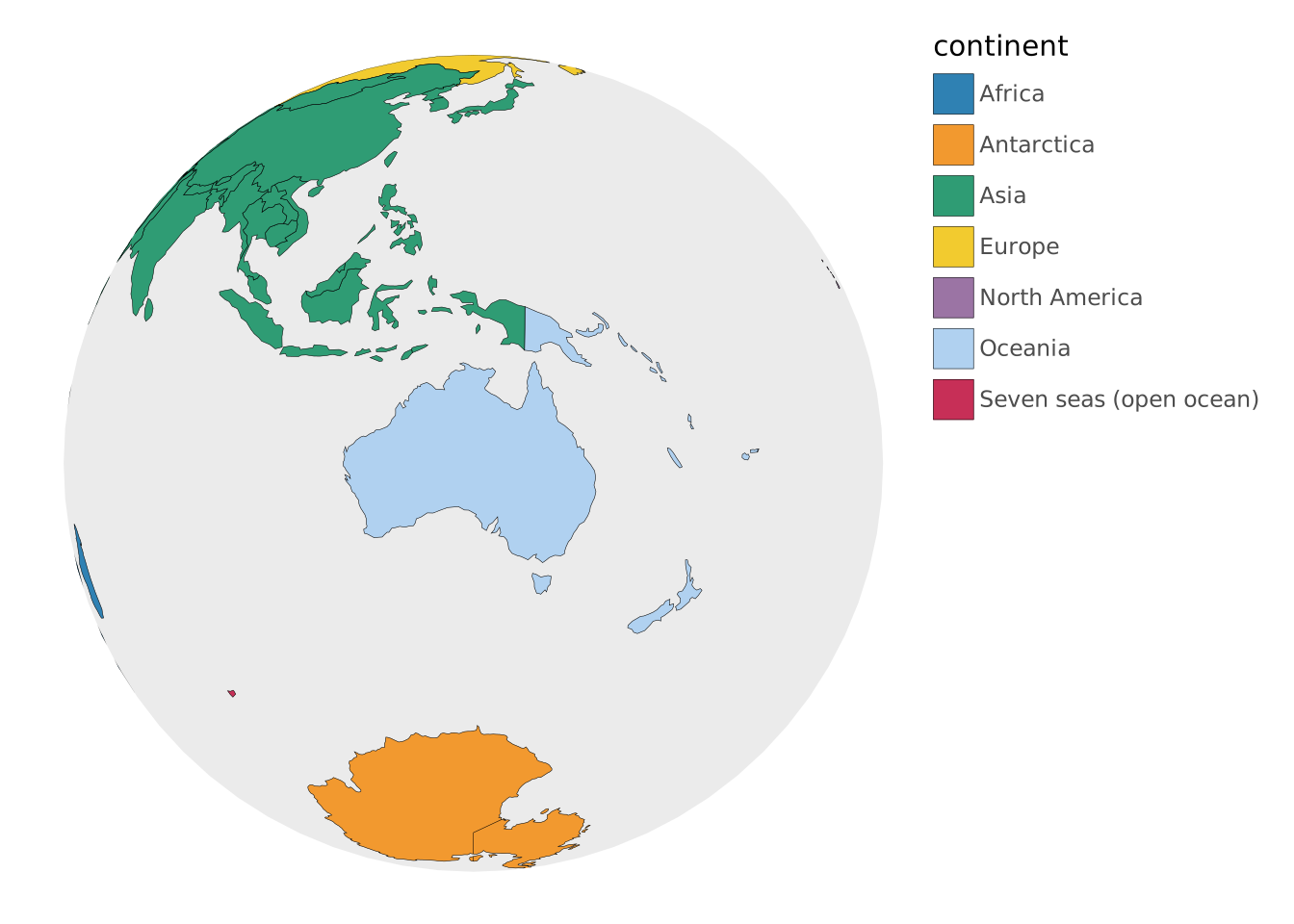
Zooming in
The default zoom behaviour is to zoom in where the data is.
VISUALISE continent AS fill FROM ggsql:world
DRAW spatial
  FILTER subregion == 'Western Africa'
PROJECT TO orthographic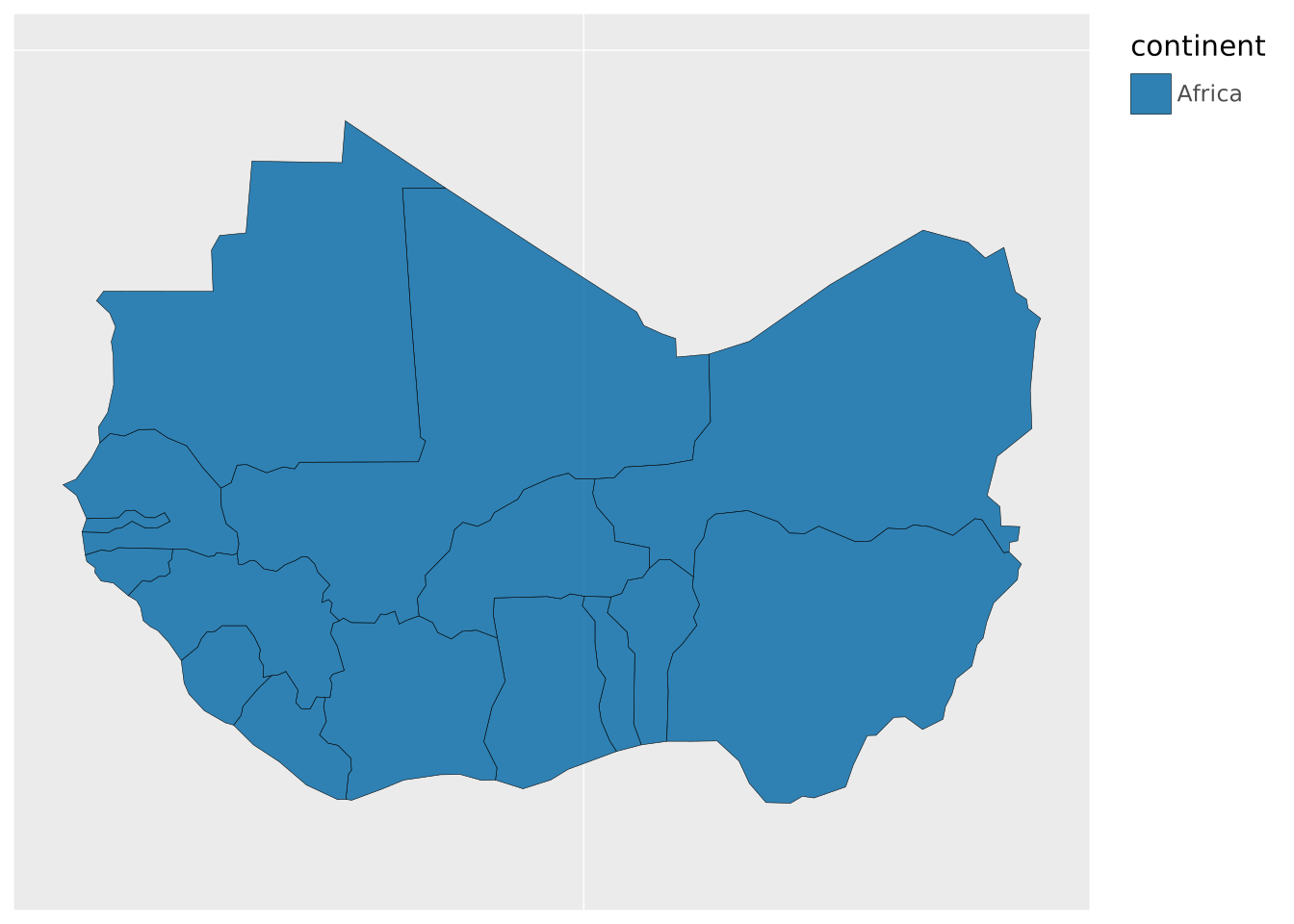
An alternative is to zoom using the bounds setting. Note that while ggsql:world is defined in degrees longitude/latitude, the orthographic projection uses metres as unit.
VISUALISE continent AS fill FROM ggsql:world
DRAW spatial
PROJECT TO orthographic
  SETTING bounds => (-1868152, 468481, 1638882, 2917218)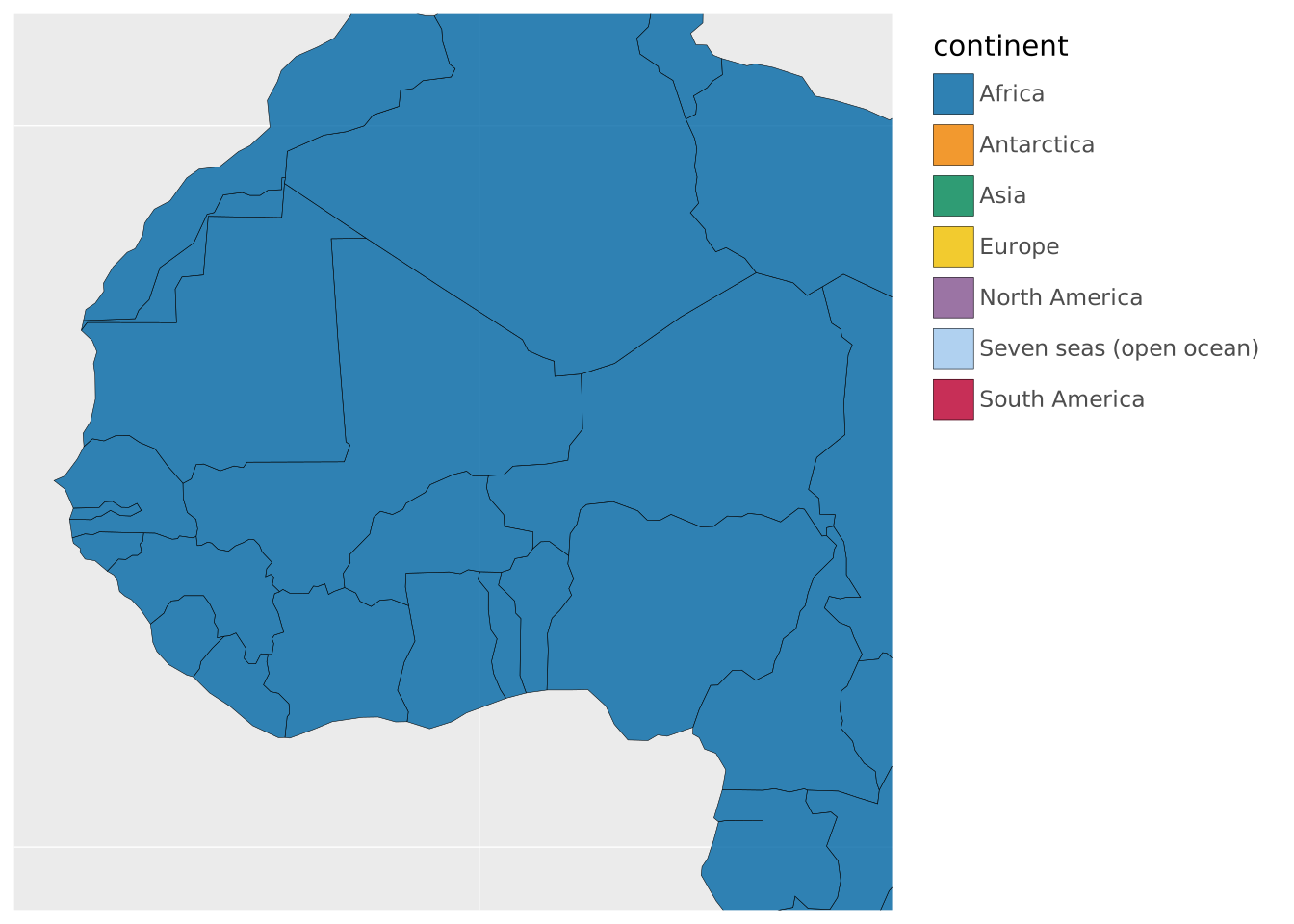
The bounds arguments can take infinites to take the visible area’s extreme values, or null to take the data’s bounds.
VISUALISE continent AS fill FROM ggsql:world
DRAW spatial
  FILTER subregion == 'Western Africa'
PROJECT TO orthographic
  SETTING bounds => (-1868152, -Inf, 1638882, null)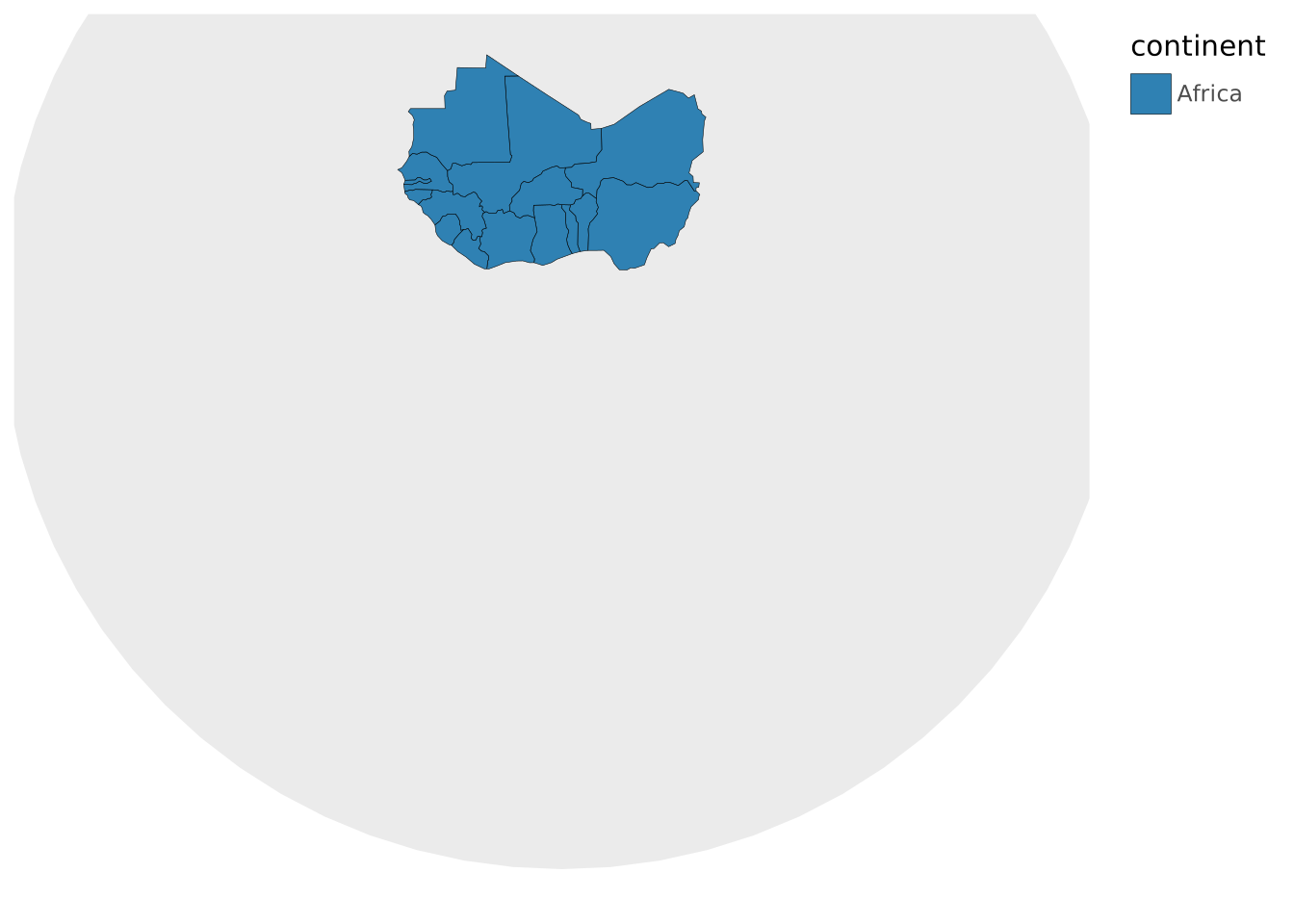
Parallels
Default conic projections aren’t always kind to the southern hemisphere. This can be changed by tweaking the parallel setting.
VISUALISE continent AS fill FROM ggsql:world
DRAW spatial
PROJECT TO albers SETTING parallel => (-29.5, -45.5)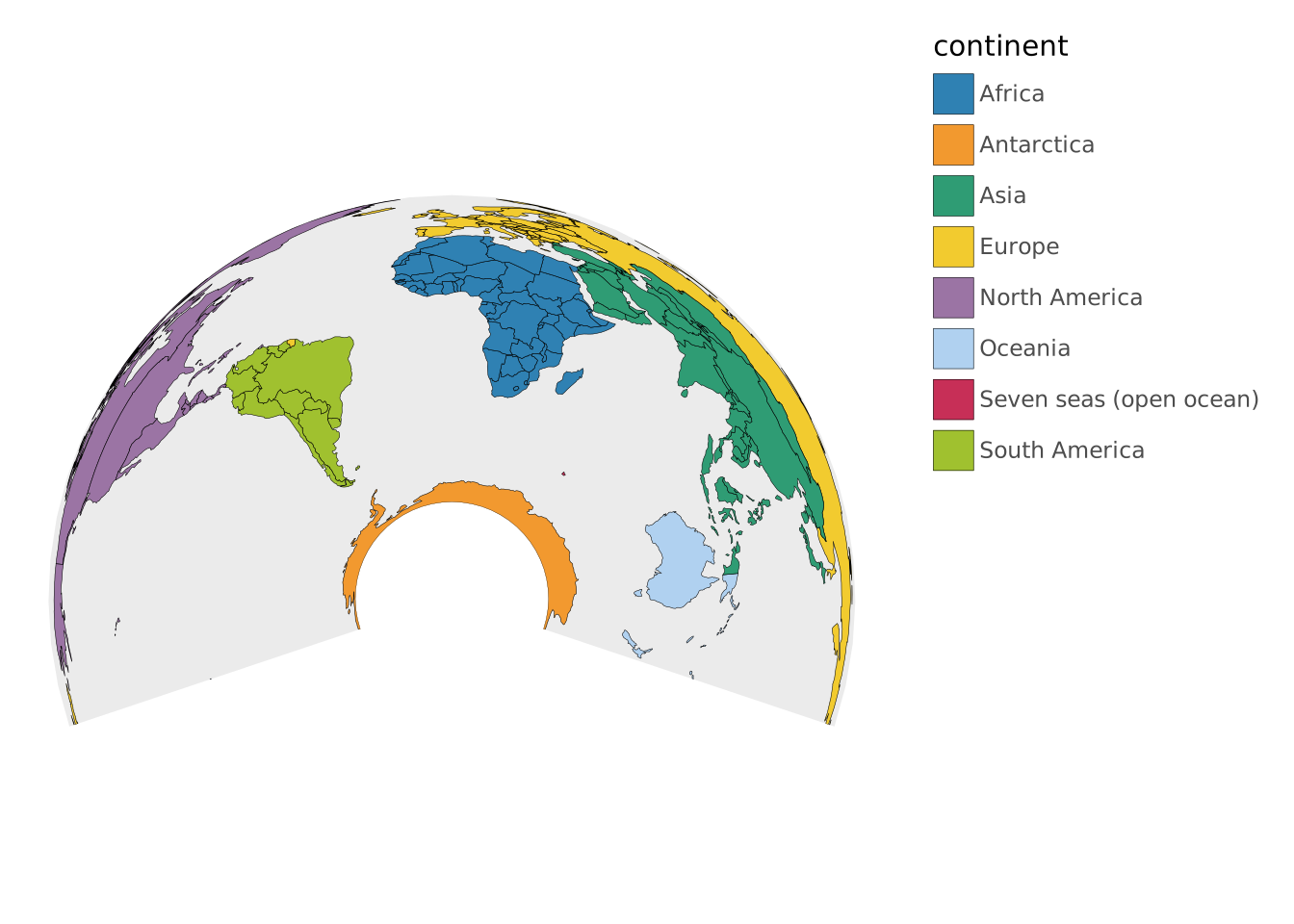
Footnotes
The origin longitude determines the UTM zone (1–60) and the origin latitude determines the hemisphere. When using
+proj=utm, the+zoneand+southparameters are used directly.↩︎